Introduction to Digital Electronics
🎯 What you'll get
1. Course Introduction
1.1 Welcome to Digital Electronics
- What is digital electronics?
- Where do we use digital electronics?
- Digital electronics in computers
- Smartphones
- Cars
- Robots
- Industrial systems
- Aerospace systems
- Home appliances
1.2 Analog vs Digital Electronics
- What is an analog signal?
- What is a digital signal?
- Continuous vs discrete signals
- Examples of analog systems
- Examples of digital systems
- Why modern electronics use digital systems
1.3 How This Online Course Works
Students learn through:
- Short video lessons
- Animated circuit explanations
- Interactive circuit simulations
- Online quizzes
- Circuit-design exercises
- Downloadable study notes
- Homework
- Mini-projects
- Final project
Online Activity
Identify analog and digital systems around your home.
Students submit examples through the NextGenBright platform.
2. Understanding Digital Signals
2.1 What Is a Digital Signal?
- Logic 0
- Logic 1
- HIGH and LOW
- Digital voltage levels
- Digital waveform
2.2 Digital Pulse
- Pulse width
- Rise time
- Fall time
- Period
- Frequency
- Duty cycle
2.3 Clock Signals
- Why digital systems need clocks
- Clock frequency
- Rising edge
- Falling edge
- Clock cycles
Interactive Simulation
Students change:
Frequency → Period → Duty Cycle
and observe the resulting digital waveform.
Quiz
10–15 interactive questions
3. Binary Number System
3.1 Why Computers Use Binary
- Transistors as switches
- ON/OFF states
- 0 and 1
- Binary representation
3.2 Binary Numbers
- Binary place values
- 4-bit numbers
- 8-bit numbers
- 16-bit numbers
3.3 Binary → Decimal
Students learn the conversion method step by step.
3.4 Decimal → Binary
3.5 Binary Arithmetic
- Addition
- Subtraction
- Carry
- Borrow
Interactive Exercises
Students enter answers and receive immediate feedback.
Example:
101101₂ = ?₁₀
4. Hexadecimal and Other Number Systems
4.1 Decimal
4.2 Binary
4.3 Octal
4.4 Hexadecimal
4.5 Binary ↔ Hexadecimal
4.6 Decimal ↔ Hexadecimal
4.7 Why Hexadecimal Is Used in Electronics
Examples:
- Microcontroller registers
- Memory addresses
- Machine code
- Debugging
- Embedded systems
Online Exercise
Convert 8-bit binary numbers into hexadecimal.
5. Digital Codes
5.1 BCD
- Binary Coded Decimal
- BCD representation
- BCD applications
5.2 Gray Code
- What is Gray code?
- Binary → Gray
- Gray → Binary
- Rotary encoder application
5.3 ASCII
- Characters represented digitally
- Letters
- Numbers
- Symbols
5.4 Parity
- Even parity
- Odd parity
- Basic error detection
Interactive Activity
Convert a character → ASCII → Binary
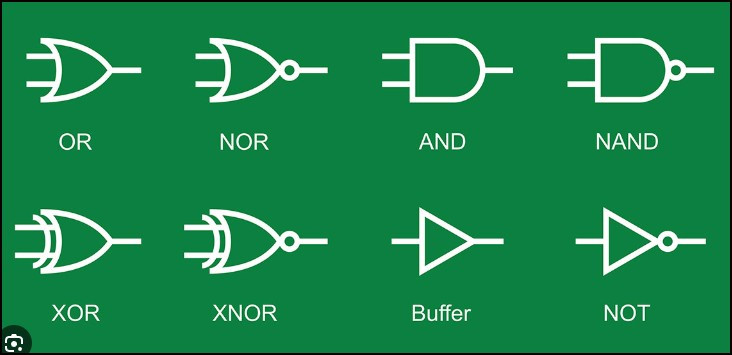
6. Introduction to Logic Gates
This should be one of the major interactive sections of the course.
6.1 AND Gate
- Symbol
- Inputs
- Output
- Truth table
- Real-world example
6.2 OR Gate
6.3 NOT Gate
6.4 NAND Gate
6.5 NOR Gate
6.6 XOR Gate
6.7 XNOR Gate
For every gate:
Concept → Animation → Truth Table → Simulation → Quiz
7. Build Logic Gates Online
Instead of physical breadboard experiments, students use a browser-based digital circuit simulator.
Virtual Experiment 1
Build an AND gate
Students:
- Place switches.
- Place an AND gate.
- Add an LED.
- Connect the circuit.
- Change input combinations.
- Record the output.
Virtual Experiment 2
Build:
- OR
- NOT
- NAND
- NOR
- XOR
- XNOR
Challenge
Can you build an AND function using only NAND gates?
8. Truth Tables
8.1 What Is a Truth Table?
8.2 Creating Truth Tables
8.3 Reading Truth Tables
8.4 Two-input Logic
8.5 Three-input Logic
Practical Online Exercise
Students are given a circuit and must determine:
Input → Output
Then they create the complete truth table.
9. Boolean Algebra
9.1 Introduction to Boolean Algebra
- Boolean variables
- Boolean expressions
- AND
- OR
- NOT
9.2 Boolean Laws
- Identity
- Null
- Complement
- Idempotent
- Commutative
- Associative
- Distributive
9.3 De Morgan's Theorems
9.4 Simplifying Boolean Expressions
Interactive Exercise
Students drag Boolean terms into the correct position to simplify an expression.
10. From Specification to Logic Circuit
This is an important practical online-design skill.
Students are given requirements such as:
"An alarm should turn ON when the door is open AND the security system is armed."
Students learn:
Requirement → Logic conditions → Truth table → Boolean expression → Logic circuit
Online Design Challenge
Create a security alarm circuit using:
- Door sensor
- Alarm enable
- AND gate
- LED/buzzer output
11. Logic Circuit Simplification
11.1 Why Simplify a Circuit?
- Fewer gates
- Lower cost
- Lower power
- Smaller circuit
- Faster operation
11.2 SOP
11.3 POS
11.4 Minterms
11.5 Maxterms
11.6 Karnaugh Maps
Students learn:
- 2-variable K-map
- 3-variable K-map
- 4-variable K-map
- Grouping
- Don't-care conditions
Online Interactive K-map
Students select cells and create groups.
The platform provides:
Correct / Try Again
feedback.
12. Combinational Logic
12.1 What Is Combinational Logic?
- No memory
- Output depends on current inputs
12.2 Multiplexer
- 2:1 MUX
- 4:1 MUX
- 8:1 MUX
- Select lines
- Applications
12.3 Demultiplexer
12.4 Encoder
12.5 Priority Encoder
12.6 Decoder
12.7 Digital Comparator
Virtual Simulation
Students build a:
4:1 Multiplexer
and change the select inputs to observe which input reaches the output.
13. Digital Arithmetic
13.1 Half Adder
- Truth table
- Sum
- Carry
- Circuit
13.2 Full Adder
- Inputs
- Sum
- Carry
13.3 Multi-bit Addition
13.4 Half Subtractor
13.5 Full Subtractor
13.6 Binary Adder/Subtractor
Online Project
Build a 4-bit Digital Calculator
Students simulate:
- Addition
- Subtraction
- AND
- OR
- XOR
14. Introduction to Sequential Logic
Now students move from circuits that only respond to current inputs to circuits that can remember information.
14.1 Combinational vs Sequential Logic
14.2 What Is Memory?
- State
- Feedback
- Storage
14.3 Latches
- SR latch
- D latch
14.4 Flip-Flops
- D flip-flop
- JK flip-flop
- T flip-flop
Interactive Animation
Students control:
Clock + Data + Reset
and observe the flip-flop output changing.
15. Digital Timing
Topics
- Clock
- Rising edge
- Falling edge
- Propagation delay
- Setup time
- Hold time
- Clock-to-Q delay
- Timing diagrams
Interactive Timing Exercise
Students are shown:
Clock + D input
and must determine the resulting:
Q output
16. Registers
16.1 What Is a Register?
16.2 4-bit Register
16.3 Shift Registers
Types:
- SISO
- SIPO
- PISO
- PIPO
Applications
- Data storage
- Serial communication
- Data conversion
Virtual Experiment
Students load binary data into a shift register and observe it moving one bit at a time.
17. Digital Counters
17.1 What Is a Counter?
17.2 Binary Counter
17.3 Up Counter
17.4 Down Counter
17.5 Up/Down Counter
17.6 Synchronous Counter
17.7 Ripple Counter
17.8 MOD Counters
- MOD-2
- MOD-4
- MOD-8
- MOD-10
Online Simulation
Students create a:
4-bit binary counter
and observe:
0000 → 0001 → 0010 → 0011 → ...
18. Seven-Segment Display
Topics
- LED segments
- Seven-segment display
- Common anode
- Common cathode
- Segment control
- BCD decoder
Virtual Experiment
Create:
Binary input → Decoder → 7-segment display
Mini Project
Digital Counter Display
Build a simulated:
0 → 1 → 2 → ... → 9
counter.
19. Digital Memory
19.1 What Is Digital Memory?
19.2 Bits and Bytes
19.3 Memory Addresses
19.4 Data Bus
19.5 Address Bus
Memory Types
- ROM
- RAM
- SRAM
- DRAM
- Flash memory
Online Activity
Students interact with a simulated memory device:
Address → Data → Read/Write
20. ADC and DAC Introduction
Students learn how digital systems interact with the physical world.
ADC
Analog signal → ADC → Digital value
Topics:
- Sampling
- Quantisation
- Resolution
- Digital representation
DAC
Digital value → DAC → Analog output
Real-world examples
- Temperature sensors
- Audio
- Battery monitoring
- Motor control
- Industrial measurement
Interactive Simulation
Students change the analog input and observe the corresponding digital ADC value.
21. CMOS and Digital Electronics Hardware
Topics
- Transistor as a switch
- MOSFET introduction
- CMOS
- CMOS inverter
- CMOS NAND
- CMOS NOR
Digital Parameters
- Logic HIGH
- Logic LOW
- Noise margin
- Propagation delay
- Power consumption
This section gives students a first understanding of how logic gates are actually implemented electronically, rather than treating them as abstract symbols.
22. Introduction to Microcontrollers
This should be an introductory module rather than a full programming course.
Topics
- What is a microcontroller?
- CPU
- Memory
- GPIO
- Timers
- ADC
- Digital inputs
- Digital outputs
Digital Electronics → Microcontroller
Students see how the concepts they learned become part of a real device.
Example:
Button → GPIO → Microcontroller → LED
23. Introduction to FPGA and Programmable Logic
Topics
- What is programmable logic?
- PLD
- CPLD
- FPGA
- Logic blocks
- Interconnect
- Digital design using HDL
Introduction to Verilog
Students see a simple example of describing:
AND gate → Verilog → Simulated output
No advanced HDL programming is required in this course.
24. Real-World Digital Electronics
Students learn how the previous modules connect to real products.
Computers
- CPU
- Memory
- Digital buses
Smartphones
- Processors
- Memory
- Sensors
Automotive
- ECUs
- Digital sensors
- CAN
- Battery-management systems
Robotics
- Sensors
- Microcontrollers
- Encoders
- Motor control
Aerospace
- Avionics
- Flight computers
- Digital control systems
Industrial
- PLCs
- Automation
- Digital sensors
25. Online Mini Projects
Instead of physical laboratory work, NextGenBright students complete virtual electronics projects.
Project 1 – Digital Security Alarm
Inputs → Logic gates → Alarm
Project 2 – Digital Door Lock
Keypad → Logic → Comparator → Unlock
Project 3 – Digital Dice
Clock → Counter → Decoder → Display
Project 4 – Digital Traffic Light
Students create a simple digital traffic-light controller.
Clock → Counter → Logic → Red/Amber/Green
Project 5 – Digital Temperature Display
Sensor → ADC → Digital processing → Display
Project 6 – 4-bit Digital Calculator
Students combine:
- Logic gates
- Adders
- Multiplexers
- Registers
- Displays
26. Final Online Capstone Project
Design Your Own Digital System
Students select one project from several options.
Option A
Digital Security System
Option B
Digital Traffic Light
Option C
Digital Counter
Option D
Digital Calculator
Option E
Digital Combination Lock
Option F
Digital Temperature Monitoring System
Students must submit:
- System description
- Block diagram
- Truth table
- Boolean logic
- Circuit schematic
- Simulation
- Test results
- Short video demonstration
- Final report